
티스토리 뷰
- 비동기 수정
- 컬러 api 선택한 값 넣어주기
document.getElementById('modiBgInput').value = color.rgb;일단 수정사항 폼에 들어갈 수있도록 value값을 변경하는 것으로 했는데 오브젝트가 넘어온다!
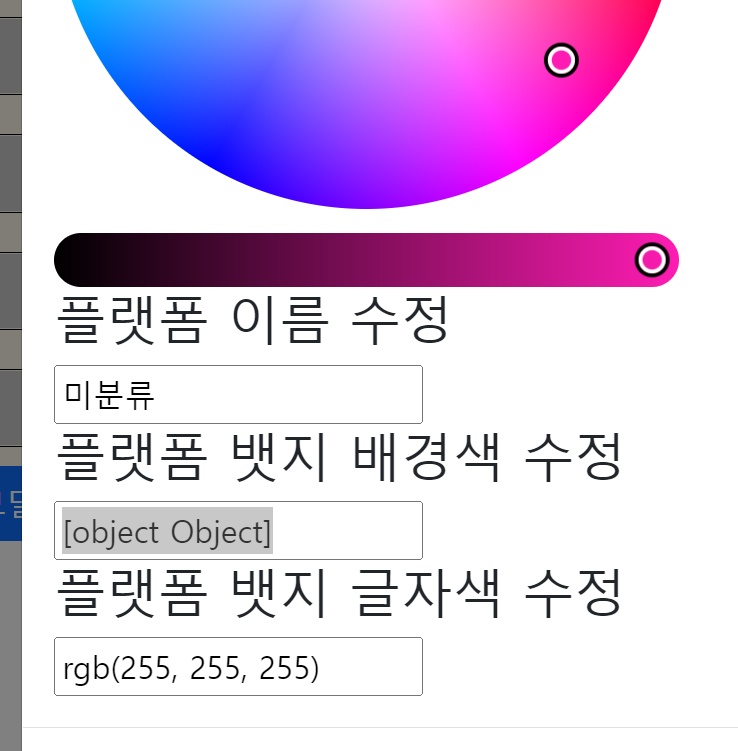
로그봐도 배열로 넘어오는 것 같은데 내가 원하는 형태는 rgb(r,g,b) 이거라서 값을 하나하나 뽑아서 옮길지 고민중,,,

| rgb | { r: 255, g: 0, b: 0 } |
| rgba | { r: 255, g: 0, b: 0, a: 1 } |
| rgbString | "rgb(255, 0, 0)" |
| rgbaString | "rgb(255, 0, 0, 1)" |
ㅎ,,, api에서 rgbstring을 따로 지원해준다
1. api 클릭하면 하나만 활성화 시켜서 띄워주기
1. removeEventListener 사용하기
https://hianna.tistory.com/494
[Javascript] 이벤트 추가, 제거하기
이번에는 element에 이벤트를 추가, 삭제 하는 방법을 정리해 보도록 하겠습니다. 1. 이벤트 추가하기 - addEventListener() 2. 이벤트 제거하기 - removeEventListener() 1. 이벤트 추가하기 - addEventListener(..
hianna.tistory.com
- 플랫폼 수정
1. 제이쿼리로 모달창 닫기
    $(document).ready(function(){
        $('#platModi').modal('hide');
    })
2. input 클릭시 컬러api 하나만 랜더링 되도록 수정
        function color(){

            console.log('color 실행');
            const $modalBody = document.getElementById('#modalBody');

            $modalBody.addEventListener('click', function(e){
                console.log(e.target);
            })

        }
2-1. 길이선택 실패
        // 글자 색상 input 수정
        function modiFontInput() {

            const IroColorPicker = document.querySelectorAll('.IroColorPicker');
            if(IroColorPicker.length > 1){
                console.log(IroColorPicker.length);
            }

            const modiFontInput = document.getElementById('modiFontInput');
            modiFontInput.addEventListener('click', modiFontInputEvent );


            // 중복이벤트 제거
            modiFontInput.addEventListener('click', function(e){
                modiFontInput.removeEventListener('click', modiFontInputEvent);
            })

        }
2-2. .IroColorPicker의 길이를 선택하지 못함으로 그 위에 있는 #picker를 이용해서 아래 계속해서 증가하는 .IroColorPicker의 길이 제어
function color(){
            console.log('color');
            const modalBody = document.getElementById('modalBody');
            const pickerHTML = document.querySelector('#picker');

            // 존재한다면?
            const picker = document.querySelector('#picker').children;
            const IroColorPicker = document.querySelectorAll('.IroColorPicker');
            modalBody.onclick = e => {
                console.log(e.target);
                if(e.target.matches('#modiBgInput') && picker.length == 0){

                    console.log('modiBgInput');
                    // input클릭시 IroColorPicker 생성
                    modiBgInputClick(e);
                    console.log('pickerHTML : ',pickerHTML);
                    console.log('picker.length(==0) : ' , picker.length);
                } else if(e.target.matches('#modiBgInput') && picker.length >= 1){
                    console.log('modiBgInput.length>=1');
                    pickerHTML.innerHTML = ``;
                    modiBgInputClick(e);
                    console.log('pickerHTML : ',pickerHTML);
                    console.log('picker.length(>=1) : ' , picker.length);

                } else if(e.target.matches('#modiFontInput') && picker.length == 0) {
                    console.log('modiFontInput.length==0');
                    modiFontInputEvent(e);
                    console.log('modiFontInput.picker.length(==0) : ' , picker.length);
                }
                else if (e.target.matches('#modiFontInput') && picker.length >= 1){
                    console.log('modiFontInput.length>=1');
                    pickerHTML.innerHTML = ``;
                    // ??????
                    // IroColorPicker.style.display = "none";
                    modiFontInputEvent(e);
                    console.log('modiFontInput.picker.length(>=1) : ' , picker.length);

                }
                //IroColorPicker.style.display = "none";
            }
            platformModifyEvent(pickerHTML);

        }
2-3. children으로 길이를 1로 제한해서 #picker 아래에 생성되는 IroColorPicker의 다중클릭으로 인한 생성을 제한함
const picker = document.querySelector('#picker').children;
'코딩 > Javascript' 카테고리의 다른 글
| 220916 replace + 정규식 제작 (2) | 2022.09.16 |
|---|